
Content Framework: “How To Operate Electric Torque Wrench?”
This guide covers five core areas. Each one builds on the last.
Here’s the structure:
- Pre-operation setup — calibration checks, capacity matching, damage inspection
- Setting your torque value — using the SET button, reading bolt specs, locking the adjustment
- Applying force right — steady pressure, slow down as you get close to the target
- Reading confirmation signals — green light, red light, buzzer, two-click mechanism
- Post-use handling and storage — resetting to minimum, protective case storage, recalibration schedules
Each section focuses on one thing. No filler. You get a repeatable process you can run through on any job. Use it for torquing head gaskets with a 3/8-inch drive Electric torque wrench. Use it for heavy industrial fastening with a 1/2-inch drive model. Same process either way.
Tolerance programming gets its own attention here. You set upper and lower thresholds — ±5% of target torque is a solid target range. That gap between controlled fastening and pure guesswork? This is what closes it.
What Is an Electric Torque Wrench and How Does It Differ From Manual Types


A motor does the work. That’s the core of it.
An electric torque wrench uses a built-in electric motor — corded or battery-powered — to put torque on a fastener. You set the target value on a digital display. The tool drives the fastener and stops right at that number. No guesswork. No “feel.” Just programmed precision, repeated the same way every single time.
Manual wrenches work on a different principle. You supply the force. A mechanical click or a sensor tells you when you’ve hit the target torque. That system works — but it leans hard on you. Your grip strength, your angle, your fatigue level at hour six of a twelve-hour shift. Variables stack up. Accuracy drifts.
Here’s where the gap becomes concrete:
| Feature | Manual | Electric |
|---|---|---|
| Power Source | Human force | Battery or corded motor |
| Torque Range | Up to ~500 ft-lb | 7 in-lb to 1,500 ft-lb |
| Accuracy | ±4–6% | ±3–5% |
| Speed | Slower | 2–5x faster |
| Cost | $50–$300 | $500–$5,000+ |
| User Effort | High, fatigue risk | Minimal |
The accuracy difference looks small on paper. In practice, tighter electronic feedback means fewer rejects, fewer stripped threads, fewer callbacks.
Where each tool belongs:
- Manual — home repairs, small shops, low-volume tasks under 50 ft-lb. Affordable. No power source needed.
- Electric — assembly lines, oil and gas, any job above 500 ft-lb where manual torque can’t get the job done safely or at a steady rate.
- Battery models — remote job sites where running a power cord isn’t an option.
One more thing worth knowing: electric wrenches also record data — torque values, timestamps, cycle counts. That matters in industries where documentation is part of compliance. A manual wrench gives you a click. An electric torque wrench gives you a log.
Pre-Operation Checklist: Before You Turn It On
Five minutes here saves you a stripped bolt, a blown deadline, or a safety incident. Run through this before every job.
1. Confirm Calibration Is Current
Check the certification label on your tool. Expired? Stop right there. ISO 6789 sets the industry standard at annual recalibration — every 12 months, no exceptions. For high-use industrial environments, Snap-on recommends tighter intervals: quarterly checks.
To verify between formal calibrations, grab a calibration verification kit. Apply a known torque at 50% of the tool’s max range. Your reading falls outside ±4% accuracy? The tool goes to the shop — not the job.
2. Match the Tool to the Fastener
Pull the fastener spec sheet. Compare it against your wrench’s range. The rule is simple: your target torque should fall between 20% and 100% of the tool’s rated maximum. Drop below 20%, and accuracy degrades fast.
A 3/8-inch drive electric torque wrench rated 5–135 Nm handles automotive lug nuts (122–163 Nm range) with no issues. A Grade 5 M10 bolt at 25 Nm dry (per SAE J429)? Same wrench works fine.
3. Inspect Sockets and Drive Connections
Match the drive size to the job:
| Drive Size | Typical Use | Socket Range |
|---|---|---|
| 1/4″ | Electronics, small fasteners | 4–13 mm |
| 3/8″ | Automotive, general mechanics | 8–24 mm, up to 100 Nm |
| 1/2″ | Heavy machinery, truck lug nuts | 16–36 mm, up to 1,000 Nm |
Check every connection by hand. Look for drive tang cracks deeper than 0.5 mm — that’s a replace-now threshold, not a watch-and-see. Check o-ring seals for tears. OSHA tool safety data links worn sockets to 15% of power tool incidents. Don’t cut corners on the socket.
4. Run the Safety Pre-Check
- Battery: Stay above 50% charge before starting. On a DeWalt 20V platform, that’s 3–4 bars on the LED indicator. A depleted battery mid-sequence doesn’t just slow you down — it throws torque readings off.
- Overload indicators: Do a no-load run under 5 seconds. Watch for red blink sequences. Milwaukee M18 tools trip overload protection at 150% of rated torque. The tool flashes warnings at rest? Something’s already wrong.
- Environment: Work in dry, ventilated conditions between 10–40°C. Use GFCI protection with ground faults below 5mA. Noise above 85 dB(A) or vibration above 2.5 m/s² (per ISO 5349) means PPE is required — gloves rated ANSI ISEA 105 cut level A5, glasses at ANSI Z87.1 minimum.
Everything checks out? Now you can turn it on.
Step-by-Step: How To Set the Target Torque Value
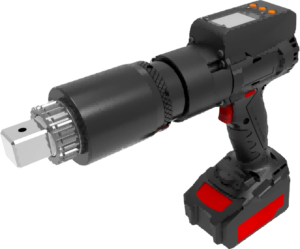

The number on the display is the whole game. Get it right, and every fastener lands where it should. Get it wrong, and your tool’s precision means nothing — you’re just putting the wrong torque in the right place.
Here’s how to set the target torque value on your electric torque wrench, step by step.
Enter Setting Mode and Input Your Value
Press the SET button to activate parameter edit mode. On models like the Mountz MTWD series, the display shifts into edit state right away. Use the Up/Down arrow keys to adjust your value. Each press moves by 0.1 or 1.0 unit, depending on your configuration. Hold the key down for rapid scrolling.
Your target number comes from one place: the manufacturer’s spec sheet. Not memory. Not habit. The spec sheet.
Check your units before entering anything. The two conversions you’ll use most:
- 1 ft-lb = 1.356 N·m
- 1 N·m = 0.738 ft-lb
Switch units through the parameter menu. The display auto-converts everything. Confirm the unit indicator is correct before saving.
Set Your Threshold Band
A single target value isn’t enough. You need three parameters working together:
| Parameter | What It Does |
|---|---|
| Maximum Torque (A) | Stops the tool and triggers an error if exceeded |
| Target Torque (B) | Your nominal setpoint — the number you’re aiming for |
| Minimum Torque (C) | Flags an error if the fastener never reaches this floor |
A ±5% tolerance band around your target is a solid starting point for most applications. Critical joints with tighter specs need narrower margins — check the joint requirements before you set the band.

Save, Verify, and Lock
Store the value to device memory. Check that the display shows what you entered. Then validate it — connect a calibration device, apply a test load, and confirm your reading falls within ±4–6% of target. No match? Fine-tune and retest.
Lock the setting before you touch a single fastener. Rotate the lock ring clockwise, or engage the software lock. Look for the “LOCKED” indicator on the display. Some models need two button presses to confirm — that’s a built-in safeguard, not extra steps.
Log the adjustment date and verified value. One entry now saves an hour of troubleshooting later.
How To Apply Torque Correctly: Technique and Body Mechanics
Your body is part of the tool. Treat it like guesswork, and your electric torque wrench becomes an expensive mistake.
The physics here is straightforward: Torque = Force × Lever Arm Distance. A longer lever arm produces more torque from the same force. That’s why a 12-inch wrench doubles the torque output of a 6-inch one with identical applied pressure. Your grip position, your stance, your shoulder angle — they’re all variables in that same equation.
Position Your Body for Clean Force Transfer
Stand square to the fastener. Feet shoulder-width apart. Back straight, knees bent just a bit. You’re not reaching — you’re aligned. Overreaching shortens your lever arm. Torque bleeds out before it ever reaches the fastener head.
Keep the applied force perpendicular to the drive axis. Side force above 5% tolerance pushes measurement deviation past 10%. That’s not a rounding error — that’s a failed joint spec. Your body twists during application. Your force vector twists with it. The wrench reads what it gets, not what you intended.
Common mistakes that kill torque accuracy:
- Spinal twist under load — rotates your force vector off-axis
- Overreaching past the fastener — collapses your lever arm
- Uneven grip pressure — creates an imbalanced force couple, producing inconsistent rotation
Slow Down Before You Hit Target
Most over-torquing happens in the last 10–15% of the tightening sequence. You’re moving fast. Momentum builds up. Then the confirmation signal fires a half-rotation too late.
The fix is deliberate tempo control. Build force in steps, not one hard push. As you approach your target value, reduce your application speed. Treat the final range like landing a plane — controlled, gradual, intentional. Near the target, slow and steady force matters. High-accuracy industrial tools use this same approach. Small adjustments in the final stretch stop overshoot before it happens.
Work Smart in Tight Spaces
Tight fasteners need a different approach. A 72-tooth ratchet head lets you work in 5-degree swing increments. That’s critical where full-arc motion isn’t possible. In those spots, shorten your stroke. Keep full socket contact with the fastener head at all times. Partial contact shifts your force vector and puts uneven torque on the fastener.
An awkward angle doesn’t mean twisting your back. Pivot your feet instead. Redirect your whole body to the new line of pull. Your spine stays neutral. Your force stays vertical to the axis. The reading stays accurate.
Reading the Signals: How To Know You’ve Hit the Right Torque
The signal fires. You stop. That’s the whole job — but only if you know what you’re looking at.
Electric torque wrenches talk to you through lights and sound. Green means you landed inside the tolerance zone. Red means you didn’t — either below the floor or past the ceiling. The buzzer fires at the same moment as the light. Both signals say the same thing: stop applying force, right now.
That tolerance zone isn’t random. You set it yourself when you defined your thresholds. A target of 100 ft-lb with ±5 ft-lb tolerance gives you a green window from 95 to 105 ft-lb. Anything outside that range triggers red. The tool isn’t judging you — it’s showing you what happened.
When the Signal Lies
Green light doesn’t always mean good. Two failure modes are worth knowing cold.
Loose socket or adapter. Vibration during the drive sequence blocks full torque transfer to the fastener. The wrench hits its target number. The fastener doesn’t. Fix: preload every socket connection to 10–20 in-lb before starting your sequence.
Angle deviation. More than 5° off perpendicular adds a torque error of 2–5% per 5° of drift. Past 90° arc from the fastener axis, stop and reposition.
The Two-Click Model
On click-style wrenches, there’s no display and no light — just two audible clicks in sequence. The second click is your stop point. Don’t keep turning. Go past that second click by more than 10% above your set value and you’ve already overtorqued the fastener. No red light. No warning. It happens without a sound.
Common Operating Mistakes and How To Avoid Them
Most torque errors don’t announce themselves. They show up later — in a stripped thread, a seized fastener, or a motor that dies three months ahead of schedule.
Here are the mistakes that matter most, and what to do about each one.
Starting a Sequence Without Locking Parameters
You set your target value. You skip the lock step. Mid-sequence, a stray button press or vibration shifts your torque setting by ±5–10%. The wrench keeps running. Nothing flags it. Every fastener after that point is off-spec.
Fix: Use the set-confirm sequence every single time. Watch for the “LOCKED” indicator before the drive head touches a fastener. Skipping this step isn’t a minor shortcut — it’s the gap between precision work and drift you won’t catch until something fails.
Over-Torquing Through Inertia
Bolt thread damage starts at 20% past the torque limit. Spindle failure follows in 10–15% of over-torque events. Most operators don’t intend to over-torque. They just don’t slow down in time.
Momentum is the real problem. Speed feels productive — right up until the tool blows past your threshold. Set your tolerance band tight. A 90–110% spec band on the digital display catches overshoot before it strips anything.
Bypassing Overload Warnings
Overload warnings exist for one reason: the motor is doing something it wasn’t built to handle. Keep ignoring a thermal cutoff, and motor lifespan drops from 5,000 hours to 2,500 — cut in half, per IEC motor protection standards.
The warning fires. You stop. Clear the condition. Then continue. Don’t push past it.
Running With a Dead Battery
Low charge doesn’t just slow the tool down — it distorts torque output. Keep charge above 50% before any sequence starts. Drop below that threshold, and the readings get unreliable. The tool may still spin, but the numbers can’t be trusted.
Maintenance and Calibration: Keeping Your Electric Torque Wrench Accurate
Precision doesn’t maintain itself. An electric torque wrench that drifts out of calibration is just an expensive way to tighten bolts wrong.
Daily Habits That Protect Long-Term Accuracy
After every job, wipe the exterior down with a dry cloth. Skip the chemical solvents — they strip internal lubrication and speed up corrosion in places you can’t see. Check for dust, grease buildup, and control knobs that feel loose or sticky. Run through the ratchet toggle, reset button, and status indicators. Thirty seconds of attention now stops a calibration failure three months down the road.
Before storing the tool, back the torque setting down to minimum — ideally zero. This keeps the spring inside the mechanism from warping over time. A spring held under tension wears out faster. Worn springs cause drifting readings. Store the wrench in its protective case, away from humidity, dust, and temperature extremes.
Recalibration Schedule
The standard benchmark: every 12 months or 5,000 cycles, whichever hits first. Heavy industrial use shortens that window fast.
Don’t wait for the schedule if any of these happen:
– The tool gets dropped or takes a hard mechanical shock
– Readings feel inconsistent across similar fasteners
– The wrench has been loaded past 25% above its rated maximum
– Visible wear appears on the drive or ratchet components
The maximum service life before mandatory recalibration is 100,000 cycles, per manufacturer specifications.
Self-Check vs. Professional Calibration
On-site self-checks work well for routine verification between formal calibrations. Apply a known load at 50% of the tool’s rated max. A reading outside ±4% means the tool needs to come out of service.
Professional lab calibration goes deeper. It covers full disassembly if needed, testing against certified torque testers, and documented compliance records. Use this after any overload event, after a drop, or to meet annual compliance requirements.
Battery Management
On battery-powered electric torque wrenches, the battery directly affects calibration accuracy. Store lithium cells at 40–60% charge for long-term storage. Full discharge and chronic overcharging both eat into battery capacity faster.
Watch for these signs of battery-driven precision loss:
– Runtime drops between charges
– The digital display acts erratically during calibration
– Multimeter voltage shows instability under a 50 ft-lb test load
Voltage that dips below the 3V range during load testing is a clear sign — replace the battery before running another torque sequence. The tool may still spin, but the readings can no longer be trusted.

Quick Reference: Electric Torque Wrench Operation at a Glance
Five steps. Every job. No exceptions.
Power on → Set → Lock → Apply → Store. That’s the full operating loop for an electric torque wrench. These are the steps that count on the floor.
| Step | Action |
|---|---|
| Power On | Hold CLR for 3 seconds — no load on the wrench |
| Set Torque | Dial or digital input to target (e.g., 100 ft-lb); typical accuracy ±3 ft-lb |
| Lock Setting | Secure the lock ring; confirm display matches your value |
| Apply Torque | Pull steady until the beep or light fires — stop the moment it signals |
| Store | Reset via CLR; back setting down to minimum scale |
Common torque benchmarks:
– Wheel lug nuts — 100 ft-lb
– Brake caliper bolts — 25–35 ft-lb
– Engine mount bolts — 40–60 ft-lb
Keep your application speed in the 10–100% of full scale range. That’s the zone where the electronics give you reliable readings. Drop below that floor, and accuracy starts to slip.
Conclusion
Mastering your electric torque wrench isn’t about memorizing specs — it’s about building a habit of precision. Set the right torque value, let the tool do its job, and trust the signal when it says you’re done. That’s the whole game.
The people who get the most out of this tool share three habits: they follow the pre-operation checklist, stay consistent with their technique, and never skip calibration. Drop any one of those three, and accuracy starts to slip. You won’t see it coming until it’s already a problem.
So here’s your next move. Pick up your electric torque wrench. Run through the pre-op checklist one time — with full attention, not on autopilot. Then practice the correct application technique on a non-critical fastener. Feel the difference. Once precision becomes muscle memory, you’ll stop guessing for good.
Tight bolts, clean work, zero rework. That’s what knowing how to operate an electric torque wrench gets you.
