
Content Framework: “Why The Electric Torque Wrench Won’t Work — What Can I Do?”
Electric torque wrench problems fall into five clear categories. Know which one you’re dealing with — and you cut your repair time in half.
Here’s what this guide covers:
- Power & battery failures — behind 60% of no-power cases. This includes contact corrosion and using the wrong battery type.
- Internal electrical disconnection — ground wires pull away from the circuit board. This shows up in Snap-On models after repeated handle twisting.
- Flex cable contact degradation — a quiet but serious issue in digital models like the Craftsman 47711. It triggers intermittent failures or shuts the tool down completely.
- Calibration mode corruption — accidental button combinations that wipe factory data for good. This one can’t be fixed at home.
- Mechanical jams — incomplete stroke cycles that lock up the ratchet mechanism over time.
Each section gives you a clear diagnostic step and a direct fix. Where home repair isn’t an option, you’ll know it straight away.
Why Your Electric Torque Wrench Won’t Turn On (Power & Battery Issues)
Eight out of ten dead electric torque wrench cases trace back to one source: the battery system. Not the motor. Not the circuit board. The battery — or more to the point, the connection between that battery and everything else.
Here’s what most people miss. A fresh battery doesn’t mean a working battery. Corroded contacts block current flow. Your wrench shows “low battery” even with brand-new cells inside. That’s what happened with a Snap-On digital model — the brass contact on the battery insert had pulled loose from repeated handle twisting. New batteries, zero power, no obvious reason. Someone finally traced it to a broken wire on the insert itself.
Run This Diagnostic Before You Do Anything Else
Work through these steps in order:
- Install fresh, high-quality batteries — check your manual for the correct type and orientation. Unior models are sensitive to cover alignment, so double-check that too
- Test voltage with a multimeter — a good cell reads ~1.5V. Anything lower means the battery is faulty, no matter what the packaging says
- Clean the contacts with isopropyl alcohol — a Topeak D-Torq wrench sat idle for five months. A new battery did nothing. Two minutes of terminal cleaning fixed it completely
- Twist the handle slowly while watching the display — the display cuts out during movement? That points to wiring pulling free at the solder joints
Cleaning Isn’t Always Enough
Clean contacts, fresh batteries, still no power. At that point, the fault is inside the handle — the wiring.
The Snap-On repair is the clearest example of how to fix this:
- Remove the 4–6 screws from the handle end
- Extract the brass battery insert — keep a spare pair of pliers ready, one may get crushed in the process
- Desolder the positive and negative wires from the circuit board
- Replace them with 22–24 AWG wire stripped from a USB cable — the gauge match matters
- Run the new wires through the handle, keeping them neat and clear of moving parts
- Reassemble in sequence: battery tray → rubber washer → plastic collar → grip → 3 alignment pins
- Resolder to the board. Check that the full battery indicator shows up and stays on during handle movement
Industry data puts the success rate of this battery-and-contact fix at over 80% for power failures. Give the basics a real shot before writing it off as a hardware loss.

Electric Torque Wrench Won’t Click — Clicking Mechanism Troubleshooting
The click is the whole point. Without it, you’re guessing — and guessing with a torque wrench gets bolts snapped and studs stripped.
An electric torque wrench that stops clicking has a mechanical problem, not an electrical one. The internal clutch system — pawl, roller bearing, spring-loaded lever — works the same way it does in manual click-type wrenches. It also fails the same way: dried grease, packed-in debris, or a worn-out dog that can no longer engage at the set torque.
Here’s what goes wrong:
Dried or hardened grease on the pawl and lever bearing — this is the #1 culprit. Lubricant hardens within 1–2 years of regular use. The mechanism then loses its clean slip-and-release action.
Jammed ratchet or stuck drive frame — high-use tools build up incomplete stroke cycles. The ratchet locks mid-cycle over time.
Dirt and debris buildup — a Pittsburgh 1/2″ wrench never clicked after a tire rotation job, then snapped a stud clean off. Debris had been building pressure the entire time without any sign.
Broken dog or miscalibrated spring — less common, but a snapped dog at 100+ ft-lbs gives no warning before something fails.
How to Open It and Fix It
Work through this in sequence:
- Remove the C-clip or retaining clip — this exposes the pawl mechanism.
- Pull the Square drive cap and pin — you get access to the ratchet wheel and dog. Proto’s J6014RK repair kit (~$20) covers most replaceable parts here.
- Extract the lever arm and roller bearing — inspect the pawl teeth, ball bearings, and slope alignment. The bearing slope must match the lever’s slant. A mismatch here causes missed clicks.
- Clean everything with solvent — pawl, bearing race, spring contact points, all of it.
Regreasing: Less Is More
Use high-pressure lithium or moly grease — the industry standard for pawl-and-bearing systems. Apply a thin layer to the roller bearing, pawl teeth, and spring contact points. Total amount per mechanism: about pea-sized. Excess grease binds the mechanism and kills the click just as well as no grease at all.
Reassembly Verification:
Seat the roller bearing in its groove and test manual slip — it should move without resistance.
Set to 27 ft-lbs and hang a 10 lb weight at a 32″ lever arm. The wrench should click at the exact moment the weight lifts.
Run the test three times. Clicks before the lift? Back off the spring tension. No click at all? Loosen the calibration sleeve a little.
Tighten the lockout pins into their pits, reinstall the lock nut, and confirm an audible click with free ratchet reverse.
A proper regrease restores torque accuracy to within ±4% — the industry standard. Skip it long enough, and you’re looking at 20–50% over-torque drift without knowing it.
Repair kits run $15–30. Professional recalibration costs $50–100. Annual lubrication stops around 90% of clicking failures. The math makes the maintenance obvious.
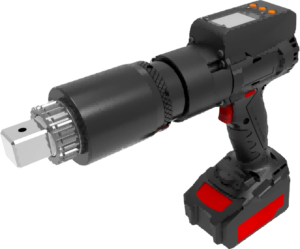
Electric Torque Wrench Won’t Ratchet — Head and Drive Repair
The Square drive spins in both directions. Nothing catches. This isn’t a calibration problem or a battery issue. The dog is broken, the spring is gone, or the drive has a chip you haven’t spotted yet.
Two failure modes show up here. They’re easy to tell apart:
Broken dog: The drive spins in both directions. Flip the direction switch — nothing loads against the splines.
Chipped square drive: Ratcheting works off and on, then slips under load. Open the head and you’ll see the damage — a crack or chip right on the drive edge.
How to Open the Head and Replace the Parts
You need a T15 Torx driver and a parts kit. The Stanley Proto J6014RK (~$15–20 on Amazon or eBay) covers the dog, spring, and square drive for most 1/2″ drives. Generic pawl and spring kits from Craftsman or Tekton run $8–12 for a budget option.
Work through this step by step. Small parts will scatter if you lose your grip on the whole assembly:
- Secure the wrench on a bench, square drive facing up. Remove both T15 head screws. Keep pressure on the assembly the whole time.
- Lift the front plate and square drive. Flip the direction switch away from the old dog to open up clearance.
- Pull the old dog and spring out. The spring’s small end seats against the dog. Note the orientation before it comes loose.
- Drop in the new dog. Position the spring with the small end toward the dog, then seat the new square drive.
- Realign the front plate. Install the first screw while holding everything in place, then add the second. Torque both to 5–7 Nm — stop there, or you’ll strip the threads.
- Test right away: flip the direction switch both ways. The drive should engage and release sharp, with zero free-spin.
After the Repair: Verify It Actually Holds
Don’t call it done after putting it back together. Tighten a lug nut to 50 ft-lbs using a reference wrench and mark the position. Back it off, then retighten to 50 ft-lbs with the repaired wrench. It should hit that mark clean — no slipping, no hesitation. Run the test across a wider range (20–100 ft-lbs) for precision work. Also, add a light coat of Tekton grease (~$10) on the internals during reassembly. It extends the life of the repair by a real margin.
Parts won’t fix everything: Replace the dog, spring, and drive — and it still spins? The problem goes deeper. You’re looking at stripped splines on the head body, a cracked cam housing, or a direction switch that won’t release after cleaning. A replacement head runs $30–50 for most 1/2″ models. DIY part swaps work out about 80% of the time. The other 20%, the head itself is done.
One hard limit to know: cordless ratchet-style electric torque tools like the Milwaukee M12 FUEL use sealed, non-serviceable heads. Free-spin on those traces back to the motor or gearbox — not the dog. Planetary gear service is possible with a $15 kit, but dog and drive parts don’t exist for those models at all. The Milwaukee service line (1-800-729-3878) is your only real option if the sealed head goes out.
Electric Torque Wrench Display Unstable or Bouncing — Digital Model Diagnostics

A bouncing display isn’t random noise. Your electric torque wrench is telling you something specific is wrong. Digital models point to two main culprits: battery voltage dropping below threshold, or a sensor wire that lost its connection somewhere along the path.
The battery threshold matters more than most people realize. Li-ion cells below 3.7V trigger display instability on most digital torque tools — even if the wrench still powers on. The LCD fluctuates, readings jump, and nothing stabilizes. Swap in a charged pack before chasing anything else.
Battery checks out fine? Then look at the sensor wiring and solder joints.
Sensor Wire and False Soldering Diagnostics
Work through this in order:
- Inspect the sensor connection wire — confirm it’s seated tight. A loose plug causes intermittent signal loss that looks just like a failing display.
- Check for false soldering — dull, cracked joints with no shine, or pins that shift under light pressure. A good solder joint is smooth, concave, and reflective. Anything else is suspect.
- Test with a logic pen or oscilloscope — keep probes isolated during powered checks. Touching probes together shorts the star measuring pin. Don’t let them make contact.
- Resolder weak points — puncture the paint layer with a probe tip rather than peeling it. Less damage, cleaner access.
Error Codes That Look Like Display Failures
Not every bouncing display is a hardware fault. These four codes cover most of what digital models throw at you:
| Code | What Triggers It | What You’ll See | Fix |
|---|---|---|---|
| Er0 | Over-torque ≥110% max capacity | “Er0” locks on power-up | Dealer recalibration; Er0 remover software if within spec |
| Er1 | Wrench not flat on startup, or fast tightening | Unstable angle readings | Press C; restart flat on a surface |
| Er2 | Angle module communication failure | Intermittent display cuts | Press C; dealer replaces screen panel if it persists |
| Er3 | Rotation faster than 30°/sec in angle mode | Readings bounce hard | Slow down; press C to reset |
One rule covers Er1 through Er3: place the wrench flat before powering up. The angle sensor fails to initialize if the tool starts at a tilt. That alone triggers Er1–Er3 codes. None of those codes mean anything is wrong with the circuit board.
Drop Damage and Calibration Drift
A dropped electric torque wrench can look fine on the outside and still bounce readings. Impact shifts the internal pivot block. The display turns unreliable even when all connections test clean. The wrench took a fall from workbench height? Send it for recalibration. ISO 6789 sets the accuracy standard at ±4%. Readings outside that range show up as display instability first — before they show up as a wrong torque output. Run a verification check each week. That catches drift early, before a bouncing display turns into a snapped bolt.
Electric Torque Wrench Won’t Adjust or Feels Stuck — Adjustment Mechanism Fix
Adjustment seizure comes down to one thing: grease breaks down, and the mechanism stops moving. After 5,000 cycles or a long stretch of humid storage, the lubricant in the adjustment sleeve hardens into paste. The sleeve binds. The setting won’t shift. You push harder — nothing happens.
Before tearing anything apart, try the quick fixes first. Tap the head against your palm three to five times. That frees sticky internals without removing a single screw. The sleeve still resists? Back off the hex or Phillips screw a quarter turn. Then ease it back an eighth turn once the resistance drops. Sometimes that’s the whole fix.
Go Deeper If It’s Still Stuck
Still no movement? Take the adjustment assembly apart in this order:
- Unscrew the calibration lock nut and pull out the full adjustment assembly — spring, ball bearings, retainer screw, all of it
- Photo or sketch every position before anything comes loose — springs compress 10–20% under load, and the ball bearings (3–5mm diameter) won’t show you where they go once they scatter
- Clean all internals with solvent — old grease, surface rust, debris around the pivot points
Re-Grease or Replace: A Quick Decision Table
| Component | Re-Grease (NLGI 2 Moly Grease) | Replace When |
|---|---|---|
| Spring | Full coat | Deformation exceeds 10% |
| Ball Bearings | Light film | Pitted, or diameter loss over 0.1mm |
| Adjustment Sleeve | Thread lubricant | Cracked or dented |
| Lockout Knob | Yes | Threading is loose |
| Hex Screw/Retainer | Clean only | Thread damage over 50% |
Replacement parts are cheap. A 1/2″ drive dog and square drive runs $10–20. Calibration shim washers — 1/4″ thick — cost next to nothing.
Verify the Fix Across the Full Range
Putting it back together isn’t the finish line. Run a full range test:
Low end (10 ft-lbs): Rotate the sleeve by hand. It should move with less than 5N of force
Mid-range (50% of max): Hang a weight at 90° — the wrench should click at the exact moment the weight lifts
Full sweep: Step through in 10% increments from zero to max. No binding, no hesitation at any point
Also cycle the batteries — pull them for five minutes, then reinstall. Check that the digital display adjusts across the 0–100% range with no lag. Post-fix accuracy should land within ±4%. That’s a touch wider than the ±2% factory spec, but it sits well within the ISO 6789 working tolerance for field repairs.
Annual recalibration makes sense after every 5,000 uses or after any drop.
Ground Wire and Circuit Board Failures — Internal Wiring Repair Guide

Your electric torque wrench passes every battery test, but still cuts out randomly. That points to one place: the internal wiring. Either a ground wire has worked itself loose — or the circuit board is failing from the inside out.
These aren’t dramatic failures. They creep. One day the display flickers. Next week it cuts out mid-job. By the time you catch it, the damage has already spread.
Diagnosing the Ground Fault First
Start simple. Don’t touch the PCB yet.
Unplug everything on the circuit. Reset the GFCI or breaker. It trips again right away? The fault lives in the wiring, not the device. Then isolate: disconnect segments one at a time. Test the GFCI reset after each one. The segment that stops the tripping is your problem zone.
Once you’ve found the zone, check these with a multimeter in ohms mode:
– Ground-to-chassis continuity should read under 1Ω
– Hot-to-ground should read infinite — any measurable current means a leak
Fixing a loose ground wire is simple. Power off at the breaker. Tighten the terminal screws with an insulated screwdriver. Terminal itself is broken? Strip 3/8″ of insulation. You want just enough bare copper to fill the crimp barrel with a sliver peeking out. Crimp on a new terminal. Shrink-wrap the barrel. Done. Using the wrong wire gauge for the terminal size is the most common mistake here. Don’t guess on that.

PCB Repair: What’s Fixable
Circuit board failures on digital electric torque wrench models break down into four categories: cracked traces, burned components, corroded joints, and moisture damage. Each one needs a different fix.
Broken trace? Bridge the gap with a conductive ink pen or a strand of 30 AWG wire soldered across the break. Keep the iron between 300–350°C. Go above 400°C and the board delaminates. There’s no fix for that.
Burned resistor or capacitor? Take a photo of the wiring connections first. Desolder the damaged component. Match the spec to the exact number. Solder in the replacement. Check the joint under magnification — a good joint looks smooth and concave. Dull or cracked means a cold joint. It will fail again.
Before closing the housing, confirm polarity. Probe suspected positive to negative in DC voltage mode. You want a steady positive reading. Ground-to-chassis should show under 1Ω. A reverse reading means something is wired backward — find it before you close up.
One verification step most people skip: power on with an inline fuse or current limiter first. Watch for unexpected heat or reverse voltage drop before moving on to full reassembly.
What NOT to Do When Your Digital Torque Wrench Malfunctions
Bad instincts make tool problems worse. Here’s what to stop doing — before the damage becomes permanent.
Keep using it through obvious symptoms. A bouncing display or unstable signal isn’t a quirk to work around. It’s the wrench telling you accuracy has already slipped. Digital torque wrenches operate within a ±4–6% tolerance. Push past that threshold and you’re guessing. That means stripped threads, snapped bolts, and assemblies that fail under load. The moment performance changes, stop. Set it down.
Use it to break loose seized bolts. Digital torque wrenches are built for controlled tightening. One direction, measured force. Reverse torque chews up the ratchet head and gear teeth fast. Once those teeth start slipping or skipping, the tool is no longer safe for precision work.
Leave it set at high torque after a job. This one’s quiet but damaging. A wrench left near max setting strains the internals and speeds up calibration drift. The click still happens, but the actual force is already off. Zero it out after every use.
Ignore a calibration deviation over 4–6%. That’s not “close enough.” Get it repaired right away, then check accuracy again after. Repair costs hit 50% or more of replacement price? For mid-range tools, that’s around $100–200. At that point, buy new instead.
Poke around the sensor wiring without a plan. Checking connections is fine. Random button presses are not. Some button combinations on digital models trigger factory calibration mode. That wipes your user presets with no way to get them back. Don’t know what a button does? Don’t press it.
Force the housing open without proper tools. No anti-static mat, no grounding strap, no certification? Don’t open it. Prying the housing apart shifts sensor alignment and kills the warranty in one move. The wrench is still under warranty? The manufacturer is your only call.
Stop DIY and Call a Pro
Four situations where home repair ends and professional recalibration takes over:
- Calibration failure stays above 6% after basic fixes
- Ratchet slips or skips under any load
- Sensor signal is absent or shorted after a full wire check
- Post-repair accuracy still won’t land within the 4–6% window
ISO-calibrated service costs less than 50% of a new wrench. The numbers make the choice clear.
Repair vs. Replace Your Electric Torque Wrench
The 50% rule settles every “should I fix it?” debate. The repair bill hits half the cost of a new tool? Stop fixing it and start shopping.
That threshold matters because an aging electric torque wrench doesn’t fail once and stop. It builds a pattern. One repair leads to another. The total cost creeps past what a replacement would have run — and you still end up with an old tool on its last legs.
The Math That Favors Repair
Some damage is worth fixing. These problems respond well to parts and a proper recalibration:
- Broken directional switch — common from forcing the mechanism, cheap to replace
- Seized internals from dirt or rust — cleanable at the surface level; a handle fused with concrete or foreign material is a different problem
- Worn ratchet or inconsistent clicking — springs, lubrication, and internal wear are fixable if the housing is intact
- Cracked handles or minor bends — fine to fix as long as accuracy stays unaffected
One firm rule applies after any repair: recalibrate to ISO 6789 or ASME B107. A fixed wrench with no calibration is just a wrench you’re guessing on.
Signals That Point to Replacement
Some failures have no repair path:
Broken or twisted square drive on a fixed head — misuse causes this. There’s no fix
Cracked circuit board or wiring shorts — outside DIY territory on digital models
Stripped drive, severe corrosion, or missing structural components — the tool is done
Replace on a Schedule, Not Just After a Crisis
Cycle count matters more than age. Recalibrate every 5,000 cycles for high-use tools — the Milwaukee M12 Digital runs on this same interval. Most manufacturer guidelines place a hard ceiling at 100,000 cycles total. Drop damage, overload, or a failed calibration check? Recalibrate right away, no matter where you are in the cycle count.
A practical habit for tools past five years of regular shop use: keep a backup unit. Downtime on a critical job costs more than a second wrench.
Buying a replacement? Check that an accredited calibration certificate comes with the purchase price. A tool without traceable calibration isn’t a precision instrument — it’s a guess with a handle.
Conclusion
Your electric torque wrench isn’t broken — it’s telling you something. A dead battery, a gummed-up ratchet head, a loose ground wire, a sensor gone haywire — every symptom covered here has a fix. And most fixes don’t require a repair shop visit or a new purchase.
The honest truth? Most people throw out tools that needed nothing more than a cleaning, a calibration reset, or a $4 replacement part.
So before anything else: diagnose first, fix second, replace as a last resort. Work through the checklist in order — power, mechanism, electronics, wiring. Hit each step, and you’ll catch the problem 90% of the time.
Do end up needing a replacement? At least now you know what to look for — and what to avoid.
Fix the wrench. Finish the job. Move on.
